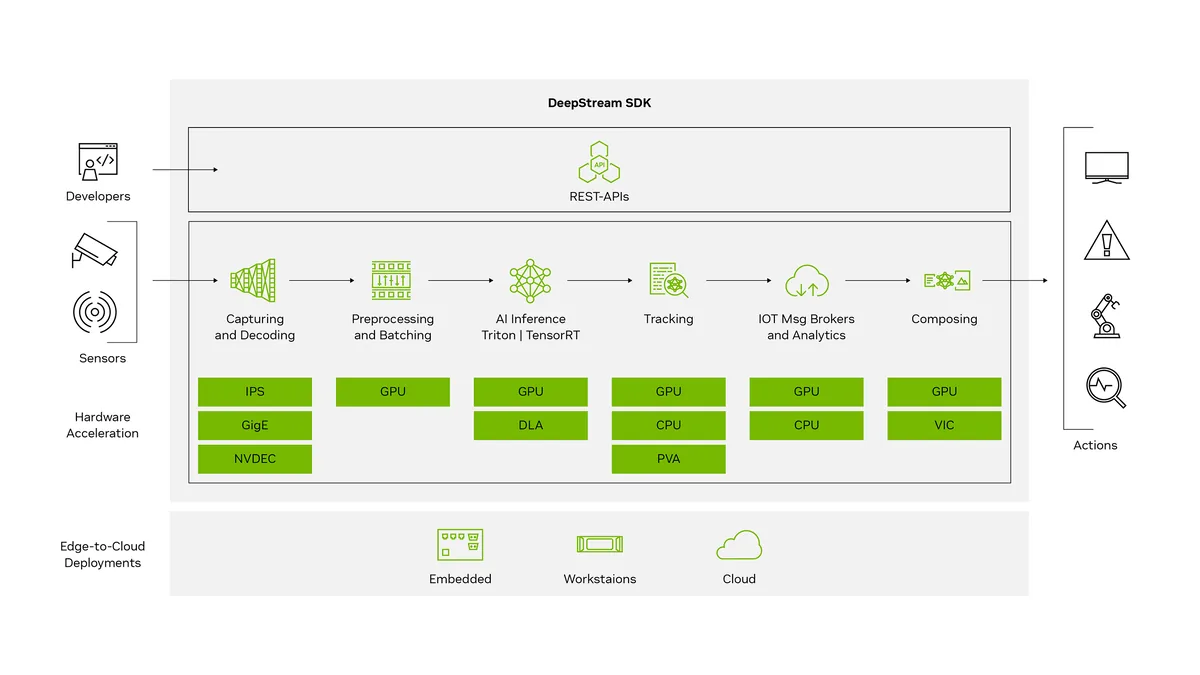
NVIDIA DeepStream is a high performance SDK for building real time video analytics applications using GPU acceleration. It is widely adopted in AI powered vision systems such as smart cities, retail analytics, industrial monitoring, and autonomous platforms.
Overview
Video data volume is increasing rapidly, making CPU only processing impractical for real time analytics. NVIDIA DeepStream addresses this by leveraging GPU acceleration through CUDA, TensorRT, and GStreamer. It enables decoding, inference, tracking, and analytics across many video streams with low latency.
What Is NVIDIA DeepStream?
DeepStream is a software development kit for scalable video analytics pipelines with a focus on:
• Multi stream video ingestion
• GPU accelerated AI inference
• High efficiency processing on edge and cloud
It runs on NVIDIA Jetson devices, discrete GPUs, and cloud GPU instances.
Architecture Overview
DeepStream applications are built using GStreamer pipelines. Each plugin handles a specific stage:
1. Video input and hardware decoding
2. Stream batching using nvstreammux
3. AI inference using nvinfer and TensorRT
4. Object tracking with nvtracker
5. Metadata generation and analytics
6. Visualization or streaming output
This pipeline model ensures optimal GPU utilization and scalability.
Key Capabilities
• Hardware accelerated video decoding
• Multiple neural networks in a single pipeline
• High frame rate processing with low latency
• Built in object tracking and metadata handling
• Integration with Kafka, MQTT, and REST APIs
Common Use Cases
• Smart surveillance and traffic monitoring
• Retail footfall and behavior analysis
• Industrial quality inspection
• Medical and healthcare video systems
• Robotics and autonomous navigation
Example 1: DeepStream Pipeline in Python
```python
import gi
gi.require_version('Gst', '1.0')
from gi.repository import Gst
Gst.init(None)
pipeline = Gst.parse_launch(
"filesrc location=sample.mp4 ! decodebin ! "
"nvstreammux name=mux batch-size=1 width=1280 height=720 ! "
"nvinfer config-file-path=config_infer_primary.txt ! "
"nvosd ! nveglglessink"
)
pipeline.set_state(Gst.State.PLAYING)
try:
while True:
pass
except KeyboardInterrupt:
pipeline.set_state(Gst.State.NULL)
```
Example 2: Primary Inference Configuration
```ini
[property]
gpu-id=0
net-scale-factor=0.003921569
model-engine-file=model.engine
labelfile-path=labels.txt
batch-size=1
network-type=0
infer-dims=3;224;224
```
This configuration controls how TensorRT loads and executes the AI model.
Example 3: Accessing Metadata in C
```c
NvDsObjectMeta *obj_meta = NULL;
NvDsMetaList *l_obj = NULL;
for (l_obj = frame_meta->obj_meta_list; l_obj != NULL; l_obj = l_obj->next) {
obj_meta = (NvDsObjectMeta *) l_obj->data;
printf("Detected object class id: %d\n", obj_meta->class_id);
}
```
This approach enables custom logic such as object counting, alerts, and analytics.
Performance Characteristics
• Dozens to hundreds of video streams per GPU
• Minimal CPU utilization
• Zero copy memory transfers
• Tight TensorRT integration for maximum inference speed
Deployment Scenarios
• Edge devices using NVIDIA Jetson
• On premise GPU servers
• Cloud infrastructure with NVIDIA GPUs
• Containerized deployments using Docker
The same DeepStream pipeline can scale from a single camera to large multi camera systems without architectural changes.